Your (New!) Client Portal

Updated: May 31

Submitit has recently made some changes. Here’s the big one: WE NOW OFFER POETRY SUBMISSIONS!!! (We're going to send an email blast about this soon.) But you’ll also notice a few other changes at your new Client Portal.
Refresh Your Screen (Probably)
If you're an existing client, after you click the link above, your browser may try to connect with our old system. To be safe, plan to do a hard refresh to clear your cache. Just click the following keys (all at once), depending on your operating system and browser:
PC: Chrome, Edge or Firefox: Ctrl + Shift + R (press all three keys at once)
Mac: Chrome, Edge or Firefox: Cmd (⌘) + Shift + R
Mac: Safari: Cmd (⌘) + Option (⌥) + R
Multiple Titles
We allow up to three titles for flash projects (fiction and creative nonfiction, fewer than 1,000 words) and up to five titles for poetry. Now, when you sign up with a new flash or poetry project, you’ll have the option to add additional titles; just click the button that looks like this:

Again, the limit is three titles for flash and five titles for poetry, matching the limits for many journals. We have a blog post coming soon on the art of adding multiple titles.
Updating Submission Statuses
By popular request, you can now update journals' submission statuses for your work. This will be especially useful for Journal List Only (JLO) clients, who submit on their own (we don’t monitor the statuses of these submissions).
To update submission statuses, click View Results for the correct project (see the Titles section at the bottom of your Client Portal dashboard).

Then, on the Results page, for the journal you’d like to update, click the three dots to the far right. The rest is self-explanatory.

For non-JLO projects, Submitit will continue to update submissions as journal replies come in, but you are now free to help us out, if you’d like.
Do-Not-Submit List for Individual Projects
Your usual Do-Not-Submit List, accessed on your Client Portal dashboard, works as before: our algorithm will avoid any journals on this list for all current and future projects.
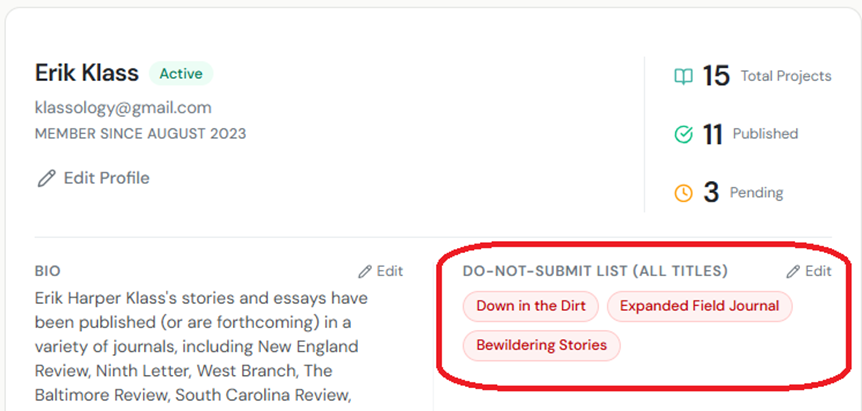
But what if you submitted your work on your own, and you’d like us to avoid relevant journals for one project only? For example, if you submitted “My Story” to A Quarterly Journal, you obviously don’t want us to submit the same story to the same journal again—but, assuming the submission is no longer pending, you might want this journal to be available for other projects. (Targeting the same journal many times is part of any good submissions strategy—just not more than once for the same piece.)
So now, you’ll see additional Do-Not-Submit Lists for individual projects. You can access each list on the View Results page for the associated project.

Keep in mind, most clients won’t have to worry about their project-specific DNS lists. These lists are only for clients who submit work on their own.
*
We’ve made many other changes, but the above covers the most important ones. If you have any questions, or run into any issues, please let us know.
For updates, tips about submitting, discussions of craft and style, and other miscellanea, please subscribe to Submitit's blog here.


